
uv locked vs frozen: the missing dependency test
A passing uv sync can leave a new dependency uninstalled. Run this small lab to see why, then use the lockfile check that matches your CI requirement.
You add a dependency to pyproject.toml. CI runs uv sync --frozen, exits successfully, and the package is still missing.
There is a small, reproducible reason for that. --frozen uses the lockfile you already have. It skips the check that would tell you the manifest has changed.
If your CI requirement is “the checked-in lockfile must match this project,” use uv sync --locked. In the test below, that command caught the mismatch.
Download the uv lockfile lab (ZIP). It includes the script, recorded output, and an MIT license. You need Python 3.11 or newer, uv, and access to PyPI. You do not need Ranex.
The failure, in five commands
The lab started with a project that had no dependencies and generated its lockfile. It then added idna==3.10 to the manifest without updating that lockfile.
| Command | Exit code | What the lab observed |
|---|---|---|
uv lock |
0 | Created the original lockfile before the manifest edit. |
uv sync --locked |
1 | Rejected the stale lockfile. Its bytes did not change. |
uv sync --frozen |
0 | Accepted the old lockfile. The new dependency was absent. |
uv sync |
0 | Updated the lockfile and installed idna 3.10. |
uv lock --check |
0 | Accepted the refreshed lockfile. |
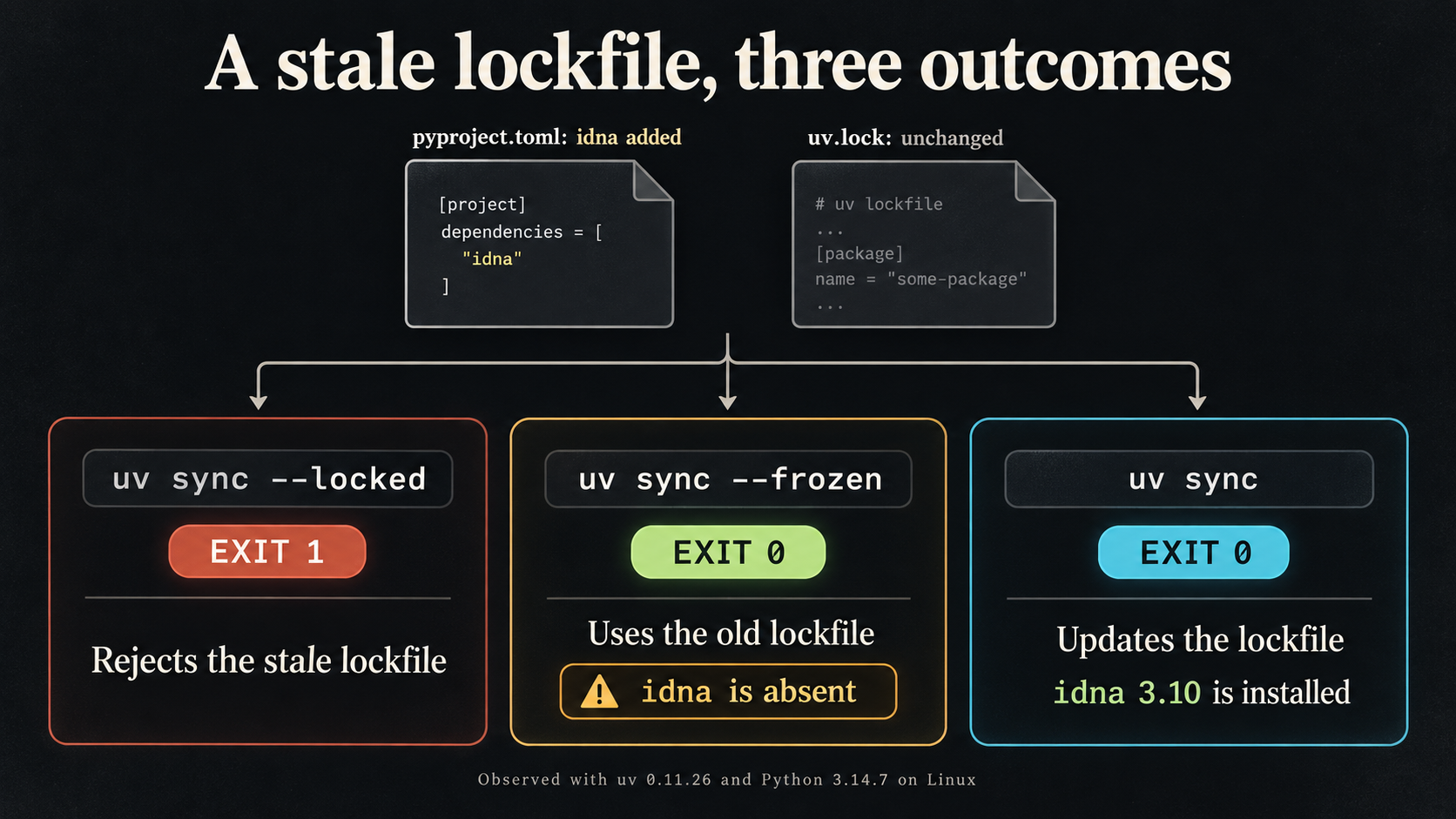
The run used uv 0.11.26 and Python 3.14.7 on Linux on September 8, 2026. These are the versions tested. The download keeps the exact command arguments, exit codes, and lockfile hashes in result.json.
Run it without touching your repository
Extract the kit, read run-lab.py, and run it from the extracted directory:
python3 run-lab.pyThe script makes its own temporary project and cache. It uses your current Python interpreter, downloads idna from PyPI into a temporary virtual environment, and removes the lab files when it exits. It does not inherit your private index settings or UV_* environment overrides.
Look for these two fields in the output:
"idna_present_after_frozen": false,
"idna_version_after_sync": "3.10"
The script checks the installed package separately from uv’s exit status. That is how it catches the successful sync with a missing dependency.
There is one detail worth keeping if you adapt the test: inspect the virtual environment’s Python directly. An ordinary uv run can update the lockfile and environment before running your check, which would change the condition you meant to inspect.
Why both flags exist
The official uv documentation distinguishes checking a lockfile from using one. --locked raises an error when the lockfile needs an update. --frozen skips that freshness check. Neither command promises to do the other’s job.
A frozen install can be intentional when a workflow is meant to consume an already approved lockfile. The trouble starts when you treat its success as evidence that the current manifest and lockfile agree. That was never the check you asked it to run.
Fix the mismatch before changing the CI flag
For a project where the dependency edit is intentional, update the lockfile locally and review the change:
uv lock
git diff -- pyproject.toml uv.lock
uv sync --locked
Commit the manifest and lockfile together. Once CI has checked out that commit and installed your chosen Python and uv versions, make uv sync --locked a step that must succeed before the application tests run.
If you only need to validate the lockfile, uv lock --check is the smaller command. It does not replace running the application tests or checking what ends up in a built container.
Do not replace a failing locked sync with a frozen sync just to clear the failure. First check whether the dependency edit was intended and whether the corresponding lockfile change was committed.
What this test covers
This is one project with one newly declared dependency. It does not test every uv release, workspaces, optional groups, private indexes, or your build image. The timings in the raw output are incidental; this is not a speed comparison.
The useful check to take back to your repository is simple: add a dependency without refreshing the lockfile on a throwaway branch. Does your required CI job reject the mismatch? Check that before assuming a green install tested it.
For a broader dependency decision, use the repository evaluation guide. More practical resources live at Open Source.
Research, code, and editing used AI assistance. Results come from the attached local run. The kit is free to use under its MIT license.
FAQ
What is the difference between uv locked and frozen?
In this lab, --locked rejected the stale lockfile. --frozen used the existing lockfile without checking whether it matched the edited project manifest.
How do I fix a stale uv lockfile?
Review the dependency change, run uv lock, inspect the diff, and commit pyproject.toml and uv.lock together. Then rerun uv sync --locked and your application tests.
Does the lab change my project?
No. It creates a temporary project, virtual environment, and cache, then removes them on exit. It requires Python 3.11 or newer, uv, and network access to PyPI.
About the author

Anthony Garces
Anthony Ryan M. Garces is a Senior Principal Lead Architect with 17+ years in IT, including four years at Pantheon on mission-critical platform work. He is building Ranex in public.
Keep reading
Your SQLite backup says OK. Two rows are missing.
A SQLite file copy passed its integrity check but missed committed rows. Reproduce it, then use the included backup utility and restore verification lab.
Open Source Signal, Week 1: What Held Up, What We Corrected, What We Left Out
Week 1 roundup: five verified highlights, five plain corrections, and what we left out, every restated fact re-checked against primary sources.
Finding an Open-Source Project Worth Your First Contribution
Five observable GitHub signals (response times, external-PR merges, release cadence) that tell you more than any good first issue label.