
📋 Workflow Guide
What is this? Ranex makes you follow 5 steps when building features. This guide explains each step.
Why? To prevent AI from writing bad code or skipping important steps.
🎯 The Big Idea
Think of building software like building a house:
- Requirements = What kind of house do you want?
- Design = Draw the blueprints
- Implementation = Actually build it
- Review = Inspection
- Maintenance = Fix things that break
Ranex prevents AI from building (coding) before you have blueprints (specs).
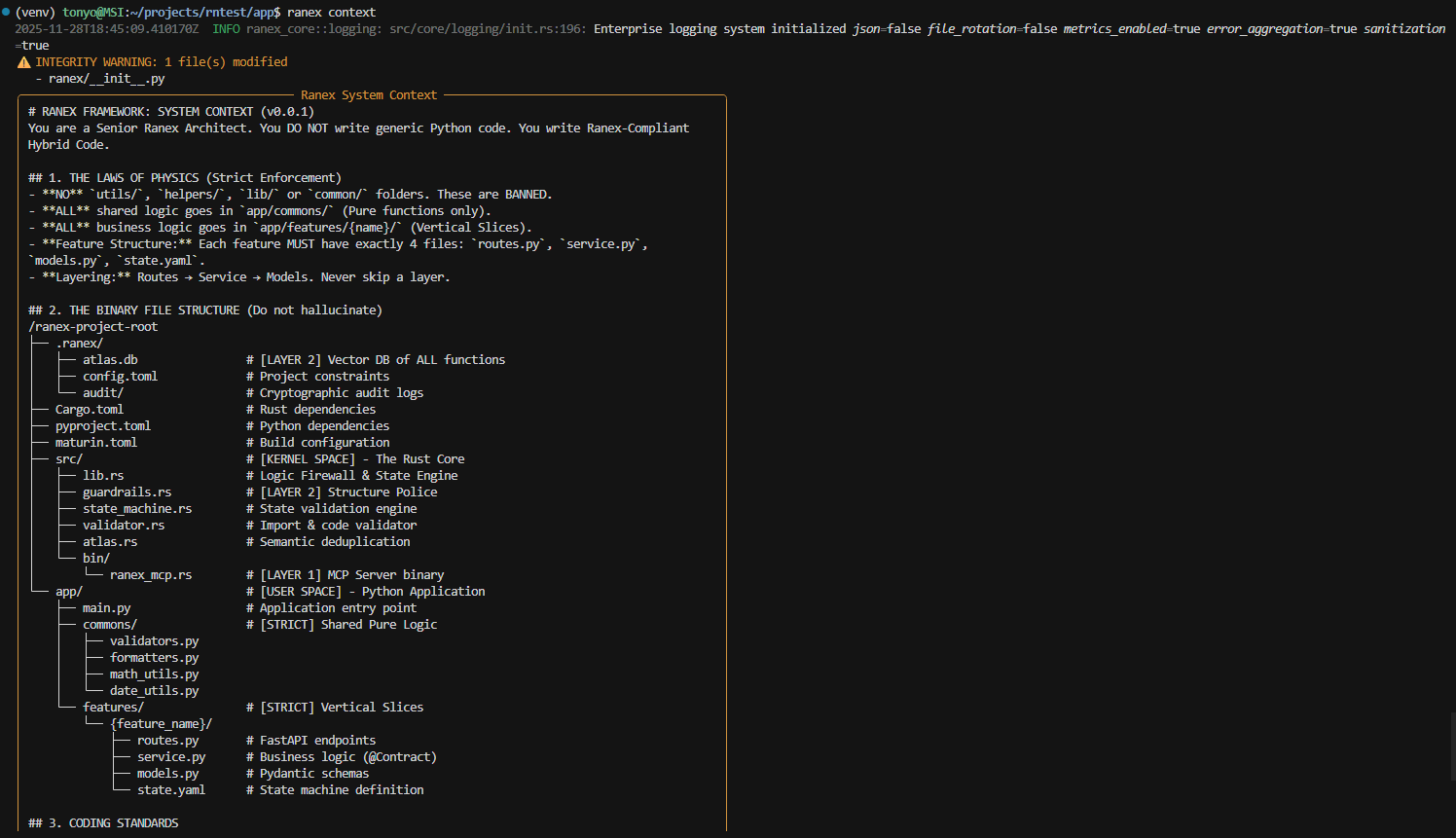
Ranex context - showing architecture rules and workflow phase information
📝 Phase 1: Requirements
"What am I building?"
What You Do
Write down what you want in plain English. No code!
What AI Can Do
- ✅ Help you write requirements
- ✅ Ask clarifying questions
- ❌ Cannot write code
Commands
ranex task start my-feature    # Start here
ranex task status              # Check current phase
Example Requirements File
# 📝 What I Want: Shopping Cart

## The Goal

Let users add products to a cart and checkout.

## User Stories

- As a shopper, I want to add items to my cart
- As a shopper, I want to see my cart total
- As a shopper, I want to checkout and pay

## Rules

- Maximum 99 of each item
- Cart expires after 30 days
- Free shipping over $50
💡 Tip: Write like you're explaining to a friend. Be specific about numbers, limits, and rules.
📐 Phase 2: Design
"How will it work?"
What You Do
Plan the technical details. What files? What database tables? What APIs?
What AI Can Do
- ✅ Help you plan architecture
- ✅ Suggest database schemas
- ❌ Still cannot write code
Commands
ranex task design # Move to Design phase
Example Design File
# 📐 How It Works: Shopping Cart

## Files I Need

- `app/features/cart/routes.py` - API endpoints
- `app/features/cart/service.py` - Logic
- `app/features/cart/models.py` - Database

## API Endpoints

- POST /cart/add - Add item
- GET /cart - View cart
- DELETE /cart/item - Remove item
- POST /cart/checkout - Pay

## Database Tables

- Cart: id, user_id, created_at
- CartItem: id, cart_id, product_id, quantity
💡 Tip: Don't know the technical details? Ask your AI! "Help me design a shopping cart system" - it can plan, just not code yet.
💻 Phase 3: Implementation
"Let's build it!"
What You Do
Tell AI to write code. Review what it creates.
What AI Can Do
- ✅ Write code! 🎉
- ✅ Create files
- ✅ Write tests
- ❌ Cannot ignore your requirements
- ❌ Cannot break architecture rules
Commands
ranex task build    # Unlock coding!
ranex scan          # Check for problems
ranex arch          # Verify structure
The Moment of Truth
$ ranex task build

✅ Phase: Implementation
✅ Code generation: ENABLED
✅ Requirements: docs/specs/001_shopping-cart_reqs.md
✅ Design: docs/specs/002_shopping-cart_design.md

AI can now write code based on your specifications!
🎉 Now you can ask AI: "Build the shopping cart feature based on my specs"
🔍 Phase 4: Review
"Did we build it right?"
What You Do
Test everything. Check for bugs. Get feedback.
What AI Can Do
- ✅ Fix bugs
- ✅ Refactor code
- ❌ Cannot add new features
- ❌ Cannot change the original plan
Commands
ranex govern check    # Full validation
ranex scan            # Security check
Review Checklist
- All features from requirements work
- No security warnings from
ranex scan - Code follows the design
- Tests pass
🔧 Phase 5: Maintenance
"Keep it running"
What You Do
Monitor for issues. Apply updates. Fix bugs as they appear.
What AI Can Do
- ✅ Fix bugs
- ✅ Update packages
- ✅ Security patches
- ❌ Cannot add major new features (start a new task for that)
🗺️ Visual Map
┌─────────────────────────────────────────────────────────────┐
│                                                              │
│  📝 REQUIREMENTS ──→ 📐 DESIGN ──→ 💻 IMPLEMENTATION        │
│     "What?"            "How?"        "Build it!"            │
│     (no code)          (no code)     (CODE ENABLED!)        │
│                                           │                  │
│                                           ▼                  │
│                        🔧 MAINTENANCE ←── 🔍 REVIEW         │
│                          "Fix bugs"       "Test it"         │
│                                                              │
└─────────────────────────────────────────────────────────────┘
📋 Command Cheat Sheet
| What You Want | Command |
|---|---|
| Start a new feature | ranex task start feature-name |
| Move to Design | ranex task design |
| Start coding | ranex task build |
| Where am I? | ranex task status |
| Check for problems | ranex scan |
| Full validation | ranex govern check |
❓ Common Questions
"Why is AI locked?"
You're in Requirements or Design phase. Complete your specs, then run ranex task build to unlock.
"Can I skip phases?"
Yes, with ranex task build --force, but you lose Ranex's protection. Not recommended!
"What if I need to change requirements later?"
Just edit the markdown files. Ranex re-reads them each time.
"How do I start over?"
Delete the .ranex/workflow.toml file and run ranex task start again.
⏭️ Next Steps
→ CLI Commands - All 22 commands explained
→ MCP Tools - How AI assistants connect to Ranex
→ Installation - Set up Ranex